
3850 (UC)
3850 (UC)
60 (UC)
325 (UC)

660 (UC)
1800 (UC)
8100 (UC)
Top-up instructions
⚠️ WARNING!
How to enter details:
Before purchasing, enter your UID (*******) followed by your Server ID (**), separated by a space.
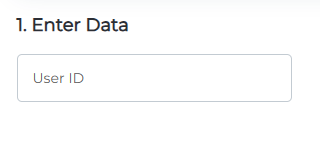
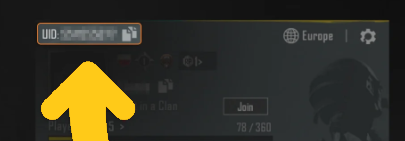
Tap the profile icon in the top-left corner.
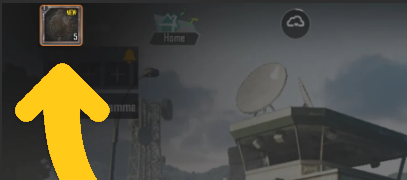
Your User ID will be shown on the profile screen.
🕐 24/7 Support
✅ Warranty
I have been working for more than 4 years.
I deliver orders quickly and with high quality.
Support hours: 10:00–17:00 (Madrid time), Monday to Friday.
GGPick is not affiliated with the game rights holder. All products are offered by independent sellers.
Buy 3850 PUBG Mobile UC on GGPICK.com and top up / recharge your UC balance by entering
UID + Server ID. A strong choice if you want to load UC with extra room for seasons and events.
🪙 3850 UC PUBG Mobile Top Up (Recharge / Load UC Balance)
The 3850 UC pack is built for players who want a higher UC balance and more freedom in the in-game shop—
without recharging too often. If you’re searching for buy PUBG Mobile UC, UC top up, UC recharge,
or load UC, this pack gives you more room to plan purchases across event cycles, store rotations, and seasonal content.
Important: enter UID + Server ID in one field, separated by a space (e.g., 123456789 12).
This helps ensure your 3850 UC top up is credited to the correct account.
What is PUBG Mobile UC?
UC (Unknown Cash) is PUBG Mobile’s premium currency used for in-game purchases and customization.
That’s why phrases like “buy UC”, “UC top up”, “UC recharge”, and “load UC balance”
are commonly used—each one refers to adding UC to your account so you can spend it in the in-game shop.
What can you do with 3850 UC?
The exact store catalog depends on your region, version, season, and active events. In general, 3850 UC is useful when you want
bigger purchases or multiple purchases close together—keeping a healthier UC balance so you can act when limited-time content appears.
- More freedom for multiple purchases without frequent recharges.
- Better preparation for seasons and event cycles.
- Use for cosmetics and customization (subject to in-game availability).
How to buy / top up 3850 UC (steps)
- Select the 3850 UC product.
- Enter UID + Server ID (separated by a space).
- Double-check the details (recommended: digit by digit).
- Complete the payment and finish your order.
Payment methods on GGPICK
You can pay with Visa, MasterCard, and cryptocurrency.
FAQ — 3850 UC PUBG Mobile
Who is the 3850 UC pack best for?
Players who prefer a higher UC balance—planning purchases around store rotations and events, and recharging less often.
What if I enter the wrong UID or Server ID?
Your UC purchase is credited to the details you enter (UID + Server ID). Please verify the identifiers and copy them directly from your profile.
What does “top up”, “recharge”, or “load UC” mean?
These terms are commonly used as synonyms for adding UC or recharging your PUBG Mobile UC balance.
100% Safe Transaction
Efficient, professional, and fully secure with complete data protection.
24/7 Customer Service
Reliable help is available at any time: before, during, and even after your purchase.
Full Refund Guarantee
Best prices, fast delivery. Unreceived or faulty items get a 100% refund.

 5.0
5.0  5.0
5.0  5.0
5.0
5.0
5.0
5.0
5.0
5.0
5.0
5.0
5.0  5.0
5.0
5.0
5.0
5.0
5.0