
Mobile Legends: Bang Bang Diamonds
Top-up instructions
🛠️ How to Recharge: Activation Guide
⚠️ WARNING!
Before making a purchase, enter your UID followed by your Server ID, separated by a space.
Due to game policy changes, US-registered accounts cannot be recharged.
Step 1: Locate your UID and Server ID
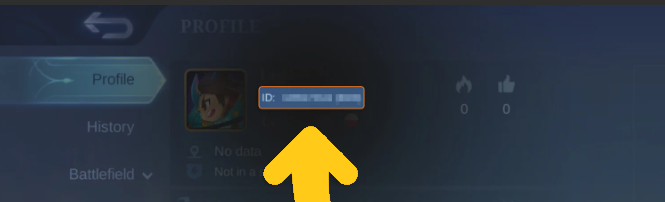
Step 2: Access your Game Profile
Click on the profile icon in the upper left corner of the main screen.
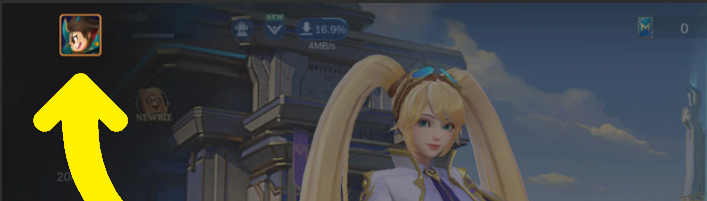
Step 3: Verification
Your Mobile Legends User ID will appear on the screen as shown below.
🕐 24/7 Support | ✅ Quality Warranty | 🛡️ Secure Platform
🧭 How to buy / top up (step by step)
- Select pack.
- Enter your UID and REGION/SERVER
- Click TOP UP.
- In checkout, choose your payment method and enter your email.
- Complete payment: you’ll receive your receipt and order status. This email is also used to access your account and chat with support in the ticket system.
Mobile Legends (MLBB) Diamonds Top-Up: Global Encyclopedia 2026
GGPick is a reliable top-up platform that supports safe and professional recharge services for Mobile Legends: Bang Bang. If you are looking to unlock premium heroes or obtain the newest skins, our secure direct top-up via UID is the most effective solution for international players.
✅ Verified Service: Active for 2026 — Secure Transactions & 24/7 Support.
💎 Select Your MLBB Package
📚 Everything About Mobile Legends: Bang Bang
Launched in 2016, Mobile Legends: Bang Bang (MLBB) is a world-renowned multiplayer online battle arena (MOBA) game. It revolves around intense PvP combat where teams of five players strategize to destroy the enemy’s tower while defending their own. Victory depends on skill, hero choice, and tactical cooperation.
What are Mobile Legends Diamonds?
MLBB Diamonds are the premium in-game currency. They allow players to:
- Unlock new heroes instantly without grinding for Battle Points.
- Purchase exclusive skins for visual prestige and battle effects.
- Participate in limited-time events and draw rare items.
- Purchase the Weekly Diamond Pass for the best value.
Why Top Up ML Diamonds on GGPick?
Purchasing Diamonds directly from the in-game store can often be expensive due to regional pricing and platform fees. GGPick offers an alternative that is:
- Reliable & Safe: We use bank-level encryption and anti-fraud monitoring to ensure secure transactions.
- Expert Support: With over 4 years of experience, we provide high-quality delivery and 24/7 customer assistance.
- No Account Access Required: We only need your UID and Server ID to process the top-up.
Frequently Asked Questions
What is the best purchase in MLBB?
The Weekly Diamond Pass is widely considered the most cost-effective purchase. It provides a steady stream of diamonds over 7 days along with additional rewards for a lower total price.
Is it safe to top up on GGPick?
Absolutely. We provide a direct top-up service that requires only your UID and Server ID. This means your private account login information remains completely confidential.
How do I check my top-up result?
Once the transaction is processed, your diamonds will be added to your balance. You can check your in-game mail for a confirmation message and specific transaction details.
How long does the delivery take?
Orders are typically delivered within a 40 minutes. While most transactions are completed swiftly, network conditions or technical maintenance may occasionally cause a slight delay (maximum 60-180 minutes).
100% Safe Transaction
Efficient, professional, and fully secure with complete data protection.
24/7 Customer Service
Reliable help is available at any time: before, during, and even after your purchase.
Full Refund Guarantee
Best prices, fast delivery. Unreceived or faulty items get a 100% refund.
Reviews

 5.0
5.0
 5.0
5.0  5.0
5.0  5.0
5.0
5.0
5.0
5.0
5.0  5.0
5.0
5.0
5.0
5.0
5.0 Add Review
FAQ
-
How do I make a purchase if I don't have a credit card?
In addition to accepting Visa and Mastercard credit cards, we also accept PSE, Banco Pichincha, Skrill, Webpay, BancoEstado, Santander, Pago Efectivo, Trustly, OXXO, 7eleven, BBVA, Bancolombia, and over 300 additional payment methods. -
How many devices can I watch on?
On our marketplace, we have a rule for sellers that at least 2 devices must be available. Most sellers include this information in the product description. -
If something goes wrong, how do I contact you?
At Ggpick, we are committed to providing the best possible service to our users. That's why we offer 24/7 online technical support with a team of highly responsible and committed professionals. After making your purchase, you will be directly connected to the seller via chat. If the seller doesn't respond immediately, we will automatically respond to help you.
If you need help with any technical issues or have any questions, don\'t hesitate to contact us through our email [email protected]. We will respond as soon as possible to solve your problems or answer your questions.
Soon we will have more people in our team, and we will add support within our website, which will be available for people who haven't placed their order yet. Everything will be ready by May 30th. -
What is the purchasing process like?
We have made the purchasing process as easy as possible to improve the experience for our users. Simply click on 'Buy', enter your email, name, and surname, choose the payment method that is most convenient for you, and make the purchase. After completing the process, you will automatically receive the purchased product. If you have any questions, don't hesitate to contact us through our email [email protected]. We're here to help you with anything you need!