
Genshin Impact Crystals
Top-up instructions
⚠️ WARNING!
How to activate:
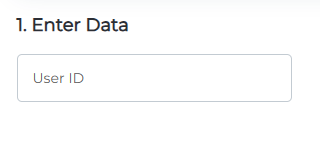
Before making a purchase, enter your UID (*******). Do not add any extra symbols.
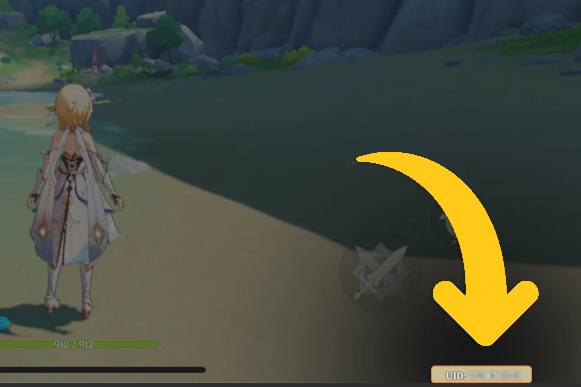
Tap the profile icon in the upper-left corner to view your UID.
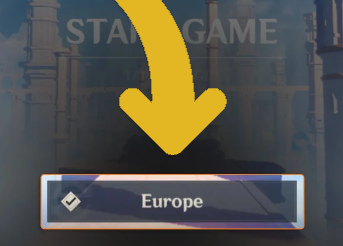
Your server region must be selected in the game’s main menu.
🕐 24/7 Support
✅ Warranty
I’ve been working for over 3 years.
I deliver orders quickly and with high quality.
GGPick is not affiliated with the game’s rights owner.
Quick summary: To buy / top up Genesis Crystals (also known as “Genshin top up”),
choose pick a pack, enter your UID and REGION/SERVER, and tap TOP UP.
In checkout, choose your payment method and enter your email to receive your receipt + order status, and to access your account and chat with support.
If you’re looking to buy Genesis Crystals, top up Genshin, or do a Genshin top up,
here you’ll find offers organized by region and a clear guide to the process: Choose pack → UID + region → TOP UP → payment.
🌍 How to choose your region (Asia / EU / US)
On GGPICK you can buy for Asia, EU, and US. Your server region is selected inside the game (main menu).
Then, on the website, choose the tab that matches your region.
💎 Available packs (same for Asia / EU / US)
- 60 Genesis Crystals
- 300+30 Genesis Crystals
- 980+110 Genesis Crystals
- 1980+260 Genesis Crystals
- 3280+600 Genesis Crystals
- 6480+1600 Genesis Crystals
- Blessing of the Welkin Moon
Note: packs like 300+30 or 6480+1600 are displayed in this exact format on the offer page.
🧭 How to buy / top up (step by step)
- Select a Genesis Crystals pack or Welkin Moon.
- Enter your UID and REGION/SERVER
- Click TOP UP.
- In checkout, choose your payment method and enter your email.
- Complete payment: you’ll receive your receipt and order status. This email is also used to access your account and chat with support in the ticket system.
⚠️ Common mistakes (avoid them)
- Wrong region: confirm your server region in the game first, then choose the matching tab (Asia / EU / US).
- Incorrect UID: double-check your UID carefully (digit by digit) before clicking TOP UP.
- Misspelled email: make sure it’s correct to receive receipt + status and to access your account.
✅ Why top up Genshin on GGPICK
- Wide selection: packs available for Asia, EU, and US, including Welkin Moon.
- Warranty: we guarantee we will fulfill your order.
- Good value: options with competitive pricing (no numbers and no “cheapest” claims).
- 24/7 Support: assistance is available anytime.
💳 Payment methods
You can pay with Visa, MasterCard, LATAM payment methods, and crypto.
Most popular crypto: BTC, ETH, USDT, BNB, USDC.
Terms of service:
https://ggpick.com/es/terms-of-service/
FAQ — Buy / Top Up Genesis Crystals (Genshin Top Up)
How do I top up Genesis Crystals with UID?
Select a pack, enter your UID and REGION/SERVER, and click TOP UP.
Then in checkout, choose payment and enter your email to receive your receipt and order status.
Which region should I choose: Asia, EU, or US?
The region is selected in the game’s main menu. On the website, choose the tab that matches your region (Asia / EU / US).
What does “Genshin top up” / “top up Genshin” mean?
It simply means buying / recharging Genesis Crystals. On this page, you do it by choosing region, pack, and UID.
What is the email used for in checkout?
To receive your receipt and order status, and also to access your account and chat with support in the ticket system.
Is Welkin Moon available in all regions?
Yes, Blessing of the Welkin Moon is available in Asia, EU, and US as a separate offer.
100% Safe Transaction
Efficient, professional, and fully secure with complete data protection.
24/7 Customer Service
Reliable help is available at any time: before, during, and even after your purchase.
Full Refund Guarantee
Best prices, fast delivery. Unreceived or faulty items get a 100% refund.
Reviews

 5.0
5.0
 5.0
5.0  5.0
5.0  5.0
5.0
5.0
5.0
5.0
5.0  5.0
5.0
5.0
5.0
5.0
5.0 Add Review
FAQ
-
How do I make a purchase if I don't have a credit card?
In addition to accepting Visa and Mastercard credit cards, we also accept PSE, Banco Pichincha, Skrill, Webpay, BancoEstado, Santander, Pago Efectivo, Trustly, OXXO, 7eleven, BBVA, Bancolombia, and over 300 additional payment methods. -
How many devices can I watch on?
On our marketplace, we have a rule for sellers that at least 2 devices must be available. Most sellers include this information in the product description. -
If something goes wrong, how do I contact you?
At Ggpick, we are committed to providing the best possible service to our users. That's why we offer 24/7 online technical support with a team of highly responsible and committed professionals. After making your purchase, you will be directly connected to the seller via chat. If the seller doesn't respond immediately, we will automatically respond to help you.
If you need help with any technical issues or have any questions, don\'t hesitate to contact us through our email [email protected]. We will respond as soon as possible to solve your problems or answer your questions.
Soon we will have more people in our team, and we will add support within our website, which will be available for people who haven't placed their order yet. Everything will be ready by May 30th. -
What is the purchasing process like?
We have made the purchasing process as easy as possible to improve the experience for our users. Simply click on 'Buy', enter your email, name, and surname, choose the payment method that is most convenient for you, and make the purchase. After completing the process, you will automatically receive the purchased product. If you have any questions, don't hesitate to contact us through our email [email protected]. We're here to help you with anything you need!