
Buy 6500 Gems for Clash Royale cheaply and at an advantageous price
6500 Gems
Top-up instructions
⚠️ Before you press TOP UP
This is a Login Top Up
This product uses a seller-assisted login delivery for Clash Royale. You choose a pack, then provide your login details on this page so the seller can complete the purchase for your account.
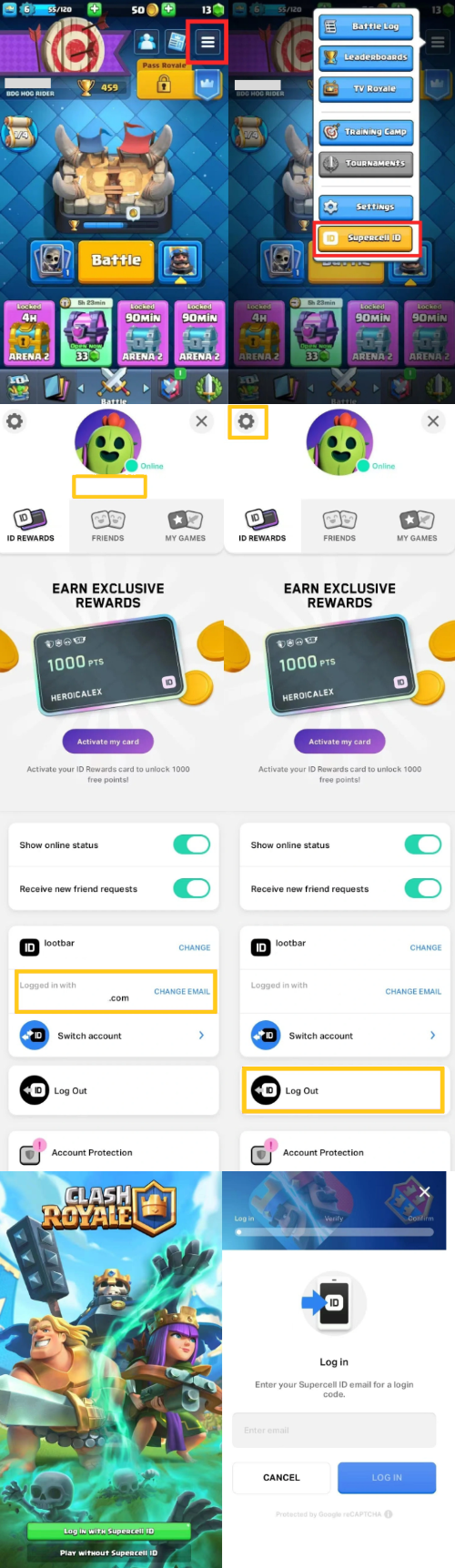
Important: if your account uses Supercell ID, the login flow can require an email verification code. Please stay available in case the seller/support asks you for a code to finish the order.
Your flow on GGPICK
Choose pack → enter login details → TOP UP → checkout (email + payment) → wait for seller confirmation.
Payments
Payment methods: Visa, MasterCard, cryptocurrency.
Support
Support via ticket or email: [email protected].
Clash Royale top up on GGPICK — Gems, Passes, and bundles via login
Use this page to buy Clash Royale paid items (such as Gems, Pass Royale, or other bundles shown on this page). This is not a self-top up. After checkout, you’ll wait for a message from the seller confirming the order has been completed.
Available packs (no prices shown here)
Select the bundle you want from the options displayed on this page. (Availability can vary by region/account.)
How to top up Clash Royale on GGPICK (login delivery)
1) Choose the pack (Gems/Pass/bundle).
2) Enter your login details on this page (the account you use for Clash Royale). If your login uses a password, include it; if your login uses a code (e.g., Supercell ID), be ready to provide the code when requested.
3) Press TOP UP.
4) In checkout, enter your email, choose a payment method, and complete payment.
5) Wait for a message from the seller confirming the order is completed, then verify in-game.
Result: how to verify
Once you receive confirmation that the order is completed, open Clash Royale and check the result in-game (Gems balance, Pass status, or the purchased bundle).
If something looks wrong, check your order status and contact support with your order details.
About Clash Royale
Clash Royale is a real-time multiplayer game by Supercell featuring card-based battles with Clash characters, where players compete to take down enemy towers and earn trophies and rewards.
What are Clash Royale Gems and Pass Royale?
Gems are a premium currency used for various in-game actions and purchases (options depend on what the shop shows). Pass Royale is a seasonal pass that provides extra rewards as you earn crowns during the season.
Quick tips (avoid issues)
• Use the login that is linked to your Clash Royale progress.
• If your account uses verification codes, stay available to share a code if requested.
• Keep your order details — they help support resolve issues faster.
FAQ
1) Is this self-top up?
No. This is a login delivery service — you provide login details and wait for seller confirmation.
2) What information is required?
Your login details for the account that holds your Clash Royale progress.
3) Will you need a verification code?
Sometimes. If your login method uses a code (e.g., Supercell ID), you may be asked for it to complete the order.
4) When do I provide my login details?
After choosing a pack, enter your details on this page, then press TOP UP to proceed to checkout.
5) How do I verify the result?
After you receive completion confirmation, open the game and check the purchased item (Gems/Pass/bundle).
6) What if I entered wrong details?
Contact support as soon as possible via order status or [email protected].
Legal notice
GGPICK is not affiliated with the game’s rights owner. Products are provided by independent sellers. All trademarks belong to their respective owners.
100% Safe Transaction
Efficient, professional, and fully secure with complete data protection.
24/7 Customer Service
Reliable help is available at any time: before, during, and even after your purchase.
Full Refund Guarantee
Best prices, fast delivery. Unreceived or faulty items get a 100% refund.
Reviews

 5.0
5.0  5.0
5.0  5.0
5.0
5.0
5.0  5.0
5.0
5.0
5.0
5.0
5.0
5.0
5.0
5.0
5.0
5.0
5.0 Add Review
FAQ
-
How do I make a purchase if I don't have a credit card?
In addition to accepting Visa and Mastercard credit cards, we also accept PSE, Banco Pichincha, Skrill, Webpay, BancoEstado, Santander, Pago Efectivo, Trustly, OXXO, 7eleven, BBVA, Bancolombia, and over 300 additional payment methods. -
How many devices can I watch on?
On our marketplace, we have a rule for sellers that at least 2 devices must be available. Most sellers include this information in the product description. -
If something goes wrong, how do I contact you?
At Ggpick, we are committed to providing the best possible service to our users. That's why we offer 24/7 online technical support with a team of highly responsible and committed professionals. After making your purchase, you will be directly connected to the seller via chat. If the seller doesn't respond immediately, we will automatically respond to help you.
If you need help with any technical issues or have any questions, don\'t hesitate to contact us through our email [email protected]. We will respond as soon as possible to solve your problems or answer your questions.
Soon we will have more people in our team, and we will add support within our website, which will be available for people who haven't placed their order yet. Everything will be ready by May 30th. -
What is the purchasing process like?
We have made the purchasing process as easy as possible to improve the experience for our users. Simply click on 'Buy', enter your email, name, and surname, choose the payment method that is most convenient for you, and make the purchase. After completing the process, you will automatically receive the purchased product. If you have any questions, don't hesitate to contact us through our email [email protected]. We're here to help you with anything you need!