


Buy Blood Strike 1100 Gold cheap and advantageous


⚠️Required Information
1. Enter your User ID.
2. Check out and select your payment method.
3. Once payment is made, Blood Strike Golds will be credited to your account shortly.
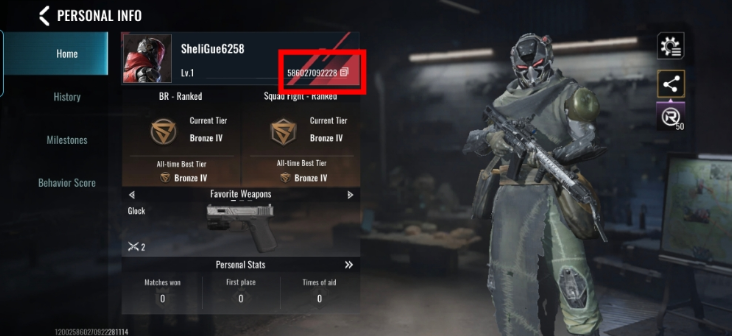
Where to find Blood Strike User ID?
1.Use your account to log in to the game.
2. Tap the “Avatar” on the Upper Left Corner.
3. Blood Strike User ID will be displayed.
Working hours are from 10:00 AM to 5:00 PM (Madrid time).
1. Enter Data
See Also














 1670
1670 

Media about us






Reviews
 5.0
5.0
5.0
5.0  4.0
5.0
4.0
5.0  5.0
5.0  3.0
5.0
5.0
5.0
5.0
3.0
5.0
5.0
5.0
5.0 Add Review
Description
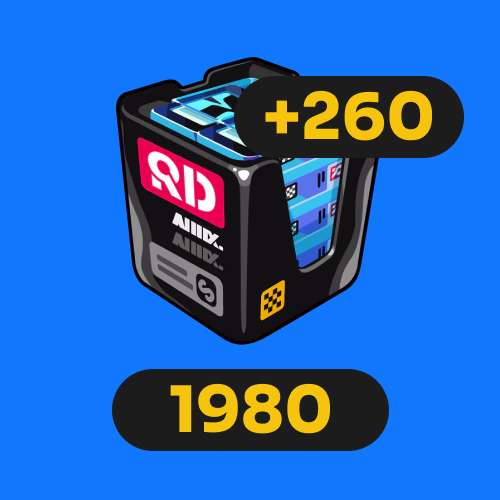
💎 Blood Strike Gold Packages – fast & secure top-up
On this page, you can buy Gold for Blood Strike quickly and conveniently. Gold is the premium in-game currency, allowing you to unlock skins, passes, upgrades, and exclusive content without relying on grinding alone.
Our 100, 300, 500, 1000, 2000, and 5000 Gold packages are designed for every type of player — from beginners to competitive users who want maximum progression.
This is a cheap and advantageous way to obtain more in-game resources and enjoy Blood Strike with expanded customization and progression options.
📦 Available Blood Strike Gold Packages
🔹 100 Gold – basic boost
The 100 Gold package is ideal for small purchases inside Blood Strike. Perfect for testing premium currency, completing quick upgrades, or buying a simple item in the store.
🔹 300 Gold – stable progression
With 300 Gold, you can start noticing real progress: minor upgrades, basic customization, and easier access to beginner-level premium content. Recommended for active daily players.
🔹 500 Gold – balanced option
The 500 Gold package offers a great balance between cost and value. Unlock more cosmetics, improve gameplay comfort, and maintain steady progression without overspending.
🔹 1000 Gold – for frequent players
1000 Gold gives you enough currency to take advantage of events, purchase multiple premium items, and tailor your loadout to your playstyle. Highly recommended for consistent Blood Strike players.
🔹 2000 Gold – competitive advantage
The 2000 Gold package is made for competitive players who want faster progression, optimized builds, and stronger performance in intense game modes. It offers better overall value than smaller packages.
🔹 5000 Gold – maximum top-up & best value
The 5000 Gold package is the perfect choice for players who want to reach the highest level. Make multiple premium purchases, fully enjoy events, and always stay stocked with resources. It is the most cheap and advantageous option overall.
🔥 Benefits of buying Blood Strike Gold cheap & advantageously
- Faster progression without depending solely on free rewards.
- More customization options for weapons, characters, and cosmetics.
- Better performance in matches thanks to upgrades and premium items.
- Take full advantage of events and limited-time offers with Gold on hand.
- Best value when purchasing larger packages like 2000 or 5000 Gold.
💡 Which Gold package should you choose?
- New players: 100 or 300 Gold for small purchases or testing the currency.
- Active players: 500 or 1000 Gold for steady and comfortable progression.
- Competitive players: 2000 or 5000 Gold for the best upgrades and long-term value.
❓ Frequently Asked Questions (FAQ)
Is this Gold usable for all premium features in the game?
Yes. Gold is the premium currency in Blood Strike and can be used for any in-game features that support it, such as items, upgrades, cosmetics, and other available content.
Is the Gold delivery fast?
The top-up process is designed to be as quick as possible after payment confirmation, so you can enjoy your Gold without unnecessary waiting.
Can I purchase from any region?
Yes — this service supports buyers from multiple regions and provides a convenient digital process for all players.
🚀 Conclusion – buy Blood Strike Gold cheap and advantageous
Buying Blood Strike Gold in packages of 100, 300, 500, 1000, 2000, and 5000 is the easiest way to boost your account, enhance your gameplay experience, and unlock more content instantly.
Choose the package that fits your needs, buy Gold cheap and advantageously, and dominate every Blood Strike match with more resources at your disposal.
FAQ
-
How do I make a purchase if I don't have a credit card?
In addition to accepting Visa and Mastercard credit cards, we also accept PSE, Banco Pichincha, Skrill, Webpay, BancoEstado, Santander, Pago Efectivo, Trustly, OXXO, 7eleven, BBVA, Bancolombia, and over 300 additional payment methods. -
How many devices can I watch on?
On our marketplace, we have a rule for sellers that at least 2 devices must be available. Most sellers include this information in the product description. -
If something goes wrong, how do I contact you?
At Ggpick, we are committed to providing the best possible service to our users. That's why we offer 24/7 online technical support with a team of highly responsible and committed professionals. After making your purchase, you will be directly connected to the seller via chat. If the seller doesn't respond immediately, we will automatically respond to help you.
If you need help with any technical issues or have any questions, don\'t hesitate to contact us through our email [email protected]. We will respond as soon as possible to solve your problems or answer your questions.
Soon we will have more people in our team, and we will add support within our website, which will be available for people who haven't placed their order yet. Everything will be ready by May 30th. -
What is the purchasing process like?
We have made the purchasing process as easy as possible to improve the experience for our users. Simply click on 'Buy', enter your email, name, and surname, choose the payment method that is most convenient for you, and make the purchase. After completing the process, you will automatically receive the purchased product. If you have any questions, don't hesitate to contact us through our email [email protected]. We're here to help you with anything you need!
 Winter Sale!